Getting WIFI from house to detached garage

7,721 Views | 31 Replies | Last: 3 yr ago by aggolfer
Trench55
How long do you want to ignore this user?
I'm new to this forum, so if this topic has been previously discussed, plead humor me. Both my house and garage have concrete brick veneer, and my router is located in an interior closet in my house. Consequently, the signal does not reach into the garage. I've done a bit of internet research on this problem, and I was curious if this group might have recommendations for a good way to get the WIFI into the garage. One idea I'm considering is installing an outdoor range extender in the attic of the house, but I'm not sure that would be the best option. At least that way I can easily run a CAT5/6 cable from the router to the extender, and the extender would be protected from the weather (except the summer heat).

Anyone have any ideas or recommendations?
yayaggies
How long do you want to ignore this user?
Could try a powerline Ethernet adapter and a cheap WiFi access point.

Easy install and should be pretty reliable as long as there are no wiring quirks between the buildings.
Trench55
How long do you want to ignore this user?
A powerline ethernet connection is another idea I'm considering. Not sure what you mean by wiring quirks. The power to the garage comes off a breaker in the main box in the house to a breaker box in the garage. Would that pose a problem?
tfunk02
How long do you want to ignore this user?
They normally work well and without issue, but I have heard of people having issues when the line was not on the same breaker. I used one once a long time ago and had no issues.
aTm2004
How long do you want to ignore this user?
Get a mesh wifi system (Google, Nest, or Eero), and get you a beacon to place into the garage. Most garages in our neighborhood are detached and extra deep, so the previous owners finished off that part. When I decided to turn it into a home gym right before COVID hit, I went this route so I could put a TV in there. I went with a Google Wifi system with 3 units and that pretty much covers my 3300 sq/ft house, garage, and pretty much the whole back yard.
dubi
How long do you want to ignore this user?
aTm2004 said:

Get a mesh wifi system (Google, Nest, or Eero), and get you a beacon to place into the garage. Most garages in our neighborhood are detached and extra deep, so the previous owners finished off that part. When I decided to turn it into a home gym right before COVID hit, I went this route so I could put a TV in there. I went with a Google Wifi system with 3 units and that pretty much covers my 3300 sq/ft house, garage, and pretty much the whole back yard.


+1
dubi
How long do you want to ignore this user?
Size of your home? 1 or 2 stories?
Trench55
How long do you want to ignore this user?
House is single story 3200sq.ft. between my router and one extender I have it covered. The garage is a three car divided into a two car stall and a one car stall. It's approx. 1200 sq. ft. It's about 15 ft from the house, and 50 ft from my router. Both buildings have concrete brick veneer which makes it hard for the signal to penetrate.
Trek Strategy
How long do you want to ignore this user?
Power line will work if the garage is on the same panel. Buy another router, plug it into the Ethernet from the power line, configure the router as an access point and you are good to go. 13 years at NETGEAR…
dubi
How long do you want to ignore this user?
Trek Strategy said:

Power line will work if the garage is on the same panel. Buy another router, plug it into the Ethernet from the power line, configure the router as an access point and you are good to go. 13 years at NETGEAR…
I did this strategy, but when I switched to mesh it was a more seamless switch between devices.

/slept at holiday inn with an Orbi mesh system
Trench55
How long do you want to ignore this user?
RE: the powerline option-- The power to the garage comes from the main panel in the house, but then goes into a sub-panel in the garage. Will this configuration still work? Also, I've read about the "A" circuits and the "B" circuits. Are the "A" circuits in the main panel the same circuit as the "A" circuits in the sub-panel?

RE: the mesh option - I"ll have to do a bit more research on this. I've seen this referred to, but I really don't understand what it is or how it works. Does this mean I have to replace my router and start over from scratch on the whole home network system? Or does the mesh network come off my existing router?

Sometimes I think I'm getting too old for this stuff?
bco2003
How long do you want to ignore this user?
Trench55 said:

Does this mean I have to replace my router and start over from scratch on the whole home network system? Or does the mesh network come off my existing router?

You can replace the router with the mesh systems, as they have the routing capability built in. Or you can keep your existing router, disable wifi on it, and use the mesh as wireless access points only (at least with eero, maybe Orbi). I use this setup because I prefer the features on my standalone router over the mesh's router.
dubi
How long do you want to ignore this user?
Quote:

Or you can keep your existing router, disable wifi on it, and use the mesh as wireless access points only (at least with eero, maybe Orbi). I use this setup because I prefer the features on my standalone router over the mesh's router.

I have an Arris cable modem router with the wireless disabled. That is connected to my orbi mesh which is in acccess point mode so all my devices, both wired and wireless, receive their IP from my modem.

So definitely keep your existing modem if your speeds are good and get a mesh system to go with it.
aTm2004
How long do you want to ignore this user?
Trench55 said:

RE: the powerline option-- The power to the garage comes from the main panel in the house, but then goes into a sub-panel in the garage. Will this configuration still work? Also, I've read about the "A" circuits and the "B" circuits. Are the "A" circuits in the main panel the same circuit as the "A" circuits in the sub-panel?

RE: the mesh option - I"ll have to do a bit more research on this. I've seen this referred to, but I really don't understand what it is or how it works. Does this mean I have to replace my router and start over from scratch on the whole home network system? Or does the mesh network come off my existing router?

Sometimes I think I'm getting too old for this stuff?

Let me put it this way...whatever other options are available, they will probably be much more time consuming and frustrating to set up. It really only took 5 minutes to get set up, and if you keep the same modem, wifi name, and passwords, you won't have to add anything back to it. It'll all connect automatically. I'm not sure on the costs for some of the options mentioned, but a mesh system runs between $150-250, replaces your router (at least it did for me) and covers a much larger area.

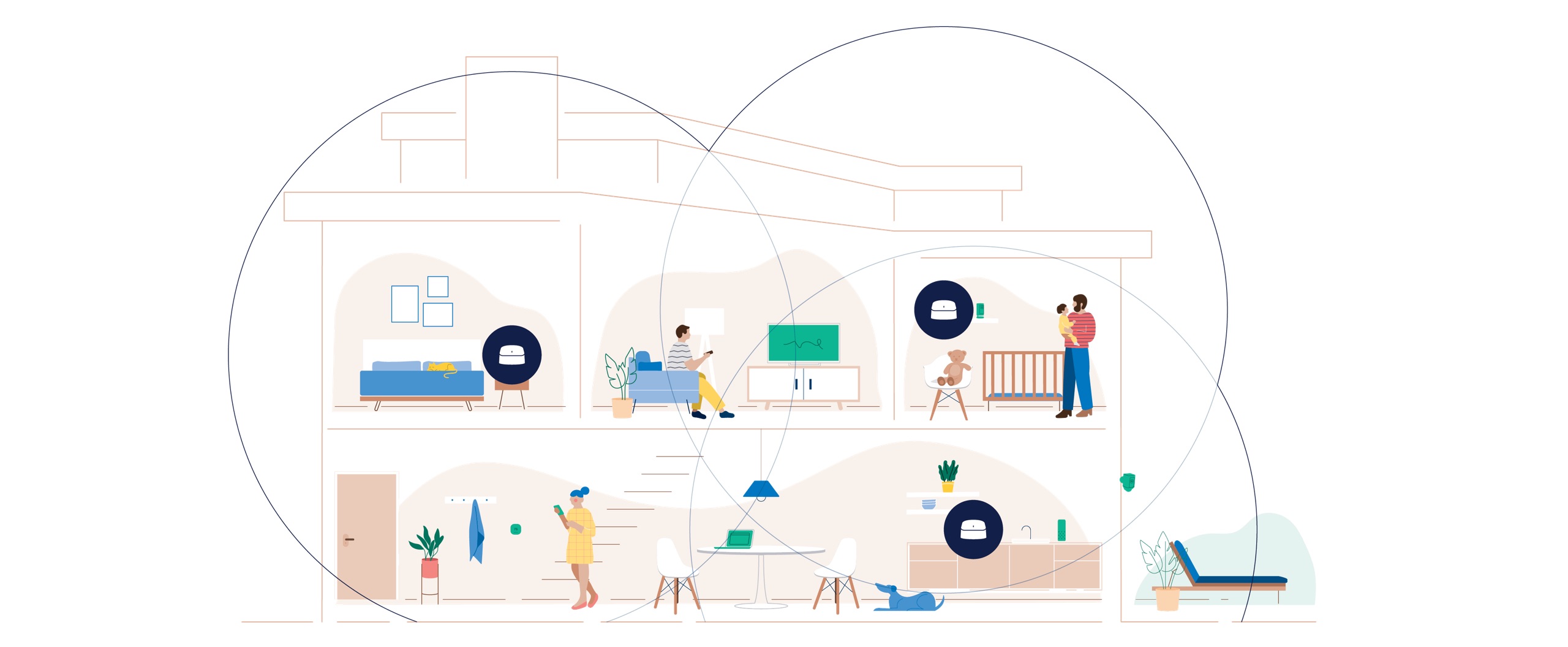
Look at a mesh system as a Venn diagram. With your current wifi router, you get one area. With a mesh system, you get 3 and there's a common spot they will overlap. There's no having to reconnect if you move out of range from one and into the range of another. It's seamless and you'll never know which point you're connected to unless you go into the app to see.

Image from Amazon for Google Wifi


Image from the Eero system

dubi
How long do you want to ignore this user?
Trench55 said:

Sometimes I think I'm getting too old for this stuff?

Where are you located? There may be someone on here who can help.
Trek Strategy
How long do you want to ignore this user?
dubi said:

Trek Strategy said:

Power line will work if the garage is on the same panel. Buy another router, plug it into the Ethernet from the power line, configure the router as an access point and you are good to go. 13 years at NETGEAR…
I did this strategy, but when I switched to mesh it was a more seamless switch between devices.

/slept at holiday inn with an Orbi mesh system
Totally agree, I was going under the assumption that even mesh wouldn't work given the building materials.
Trek Strategy
How long do you want to ignore this user?
I agree that mesh is the easiest solution here, and if the garage is only 15 feet away, there's a mesh configuration for you that should work even if you have to mount them in a window or outside. i think some of the NETGEAR stuff is outdoor rated.

What's your budget? let me know and I'll tell you what i'd recommend. I like NETGEAR, and I'm biased, but I know what kind of data google and amazon collect and I prefer the non-big tech options because they're less invasive. More expensive, but better overall technology and less invasive. Plus, if you buy something made in the last couple of years, you should be future-proofed for at least 5 years.

If your budget is $150 or less, I'd look at powerline and an access point. The $150 mesh systems are pretty crap.

Edit: with mesh, you'll love the seamless connectivity all over the network. with the patchwork solutions, sometimes your device doesn't know when and how to disconnect and re-connect to the best possible node that gives you the best throughput.

https://www.netgear.com/home/wifi/mesh/orbi/?cid=us-best-wifi6-srch-cpc&utm_source=search&utm_medium=cpc&utm_campaign=us-best-wifi6-srch-cpc&msclkid=1f0271bef25e148a8bc4100ce8114de7&utm_term=orbi&utm_content=%5Borbi%5D
Trench55
How long do you want to ignore this user?
I'm located in rural Gillespie County about 8 miles out of Fredericksburg. I like the idea of the mesh network, and I have access to enough windows that I should be able to get the signal to the garage. As far as budget, I won't say unlimited, but I can certainly exceed $150, if necessary. Adding an outdoor device is certainly an option.

I would welcome any recommendations.
Trek Strategy
How long do you want to ignore this user?
This is a pretty good deal on a 3 pack system.

https://www.amazon.com/NETGEAR-Nighthawk-Advanced-System-Security/dp/B08V3PMGBR/ref=sr_1_11?keywords=mesh+wifi&qid=1639070835&sr=8-11


Trek Strategy
How long do you want to ignore this user?
If you must have the outdoor rated extender, assuming the indoor setup doesn't work, here's an extender that will work with the Nighthawk.

https://www.netgear.com/home/wifi/mesh/rbs50y/

FatZilla
How long do you want to ignore this user?
Just something to keep in mind with Mesh networks. Some older devices will not work with the single SSID and seamless switching. So switching your whole home over, you may run into issues with getting your older devices back online (Looking at you my damn old neato vac). Unless you understand how to troubleshoot and change your advanced settings, it will not be a simple plug-n-play for you if this happens. Powerline + AP will not be effected by this and Yes to your question about the panels. Most modern panels will not block the Powerline kits. I have only even seen it in very very old panels. Even in my old house with a 30 y/o panel + sub panel running to my detached garage, the connection was perfectly usable even for gaming.
Trench55
How long do you want to ignore this user?
Thanks for all the information and suggestions. I've decided to go with the mesh option and have ordered the unit recommended by Trek Strategy, plus an extra satellite for the garage. It may take a bit of trial and error to get the positioning right, but I think I can handle that. As for the issue of older units, I think all of those are hardwired into my router, so that shouldn't be a problem. Again, thanks to all.
FatZilla
How long do you want to ignore this user?
Trench55 said:

Thanks for all the information and suggestions. I've decided to go with the mesh option and have ordered the unit recommended by Trek Strategy, plus an extra satellite for the garage. It may take a bit of trial and error to get the positioning right, but I think I can handle that. As for the issue of older units, I think all of those are hardwired into my router, so that shouldn't be a problem. Again, thanks to all.

Another small item to consider. Most mesh units only have 1-2 Ethernet ports vs traditional routers having 4+. You might need a new switch to go along with your mesh unit.
dubi
How long do you want to ignore this user?
Quote:

Another small item to consider. Most mesh units only have 1-2 Ethernet ports vs traditional routers having 4+. You might need a new switch to go along with your mesh unit.
Very good point.

Most of my house is wired and from my cable modem which assigns IP's, i have cat5e to a 20 port switch and also to my Orbi to provide the wireless.
Trench55
How long do you want to ignore this user?
Thanks for the suggestion about the switch. I have a couple in the family room that go to all the electronics in there, but I'll have to check on what else is hardwired into the router. Guess the three wall ports that I installed around the house and a usb hard drive. Yep, a new switch is definitely going to be needed. Thanks.
Trek Strategy
How long do you want to ignore this user?
Trench55 said:

Thanks for the suggestion about the switch. I have a couple in the family room that go to all the electronics in there, but I'll have to check on what else is hardwired into the router. Guess the three wall ports that I installed around the house and a usb hard drive. Yep, a new switch is definitely going to be needed. Thanks.
if you have the scratch, look for a switch that is faster than GB. 10 GBE is full-blown future proofing, but they are still expensive. The cheaper tweener option is something called multi-gig that can get you between 2.5 and 5 GBE.
aggolfer
How long do you want to ignore this user?
will these mesh systems work as a repeater off of themselves or does each one have to reach "home base"
dubi
How long do you want to ignore this user?
Trek Strategy
How long do you want to ignore this user?
aggolfer said:

will these mesh systems work as a repeater off of themselves or does each one have to reach "home base"
They are actually all different, which is why you see price points all over the place. I looked at them yesterday and that category has become really confusing to the consumer because there's very little oversight in place, so companies are torturing the marketing speak to try to separate.

Most of the satellites talk back to the home base and use part of their bandwidth to communicate, so you're never getting the full advertised speed. Some of them can be configured in a daisy chain system. Orbi actually built in a separate 5GHZ channel only for communication between the nodes so that you actually get the advertised speed. Also watch out for dual-band and tri-band, which makes a huge difference. The cheap systems will have only one band they use.

There is a lot of other cool features built in like QoS and Beamforming to improve the connection to the devices and allow you to prioritize traffic. Of course you have guest network as well. The seamless handoff is really what people will love the most, and of course getting coverage everywhere.
Trench55
How long do you want to ignore this user?
Again, thanks for all your help. All my new hardware arrived this afternoon, and it only took about an hour and a half to get everything up and running. WIFI is now available in the garage. Signal strength is very good throughout the house and in the garage. The whole process went virtually seamlessly.
dubi
How long do you want to ignore this user?
I'm glad it was easy!
aggolfer
How long do you want to ignore this user?
Just setup the orbi with daisy chain for my shop. I should have done this a long time ago instead of fighting with the cheap extenders. Full coverage in all areas in the shop even with the doors shut.
Refresh
Page 1 of 1
 
×
subscribe Verify your student status
See Subscription Benefits
Trial only available to users who have never subscribed or participated in a previous trial.