Help me set up dual monitors connect to PC and laptop

3,160 Views | 15 Replies | Last: 6 yr ago by boy09
infinity ag
How long do you want to ignore this user?
My current setup is to have my PC with a Video Card with 2 outputs going into 2 monitors so I can get an extended display.

What I want to do is use my work laptop in the same configuration so I can use it with my 2 monitors in an extended display mode. However, I want to be able to switch back and forth easily from my PC to my Laptop and back with the only thing I do is connect my laptop to a cable.

Is this possible? If so how?
boy09
How long do you want to ignore this user?
A 4x2 hdmi matrix would probably work for you. 4 inputs (2 from desktop, 2 from laptop) and 2 outputs to your monitors.

https://www.monoprice.com/product?p_id=14529
infinity ag
How long do you want to ignore this user?
Thanks for the suggestion, I hadn't found this when I was researching.

Are you sure this does Extend Display rather than just Duplicate? I want my laptop to also be shown across 2 monitors when I connect and switch to it.
infinity ag
How long do you want to ignore this user?


Claude!
How long do you want to ignore this user?
Do your monitors have multiple input sources? In the past, I've connected my laptop dock to my monitors with HDMI and connected to my desktop with Display Port, then just swapped the input on the monitor when I needed to switch.
infinity ag
How long do you want to ignore this user?
Claude! said:

Do your monitors have multiple input sources? In the past, I've connected my laptop dock to my monitors with HDMI and connected to my desktop with Display Port, then just swapped the input on the monitor when I needed to switch.

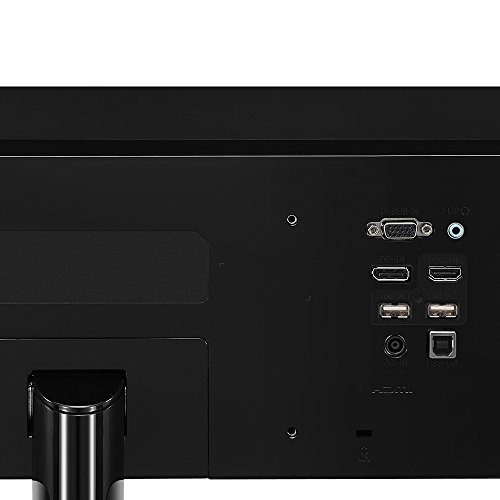
I have two monitors of type LG 32MA68HY-P 32.0" 1920x1080 60 Hz Monitor


boy09
How long do you want to ignore this user?
infinity ag said:


I can't see why this wouldn't work with an extended desktop.. Maybe I'm missing something.
tk for tu juan
How long do you want to ignore this user?
KVM switch

bigtruckguy3500
How long do you want to ignore this user?
I think I see a display port on there. If that's the case, you could connect one computer with display port, another with HDMI, and then Daisy chain the monitors together with display port.

Edit: NVM, I think there's only one DP.
Claude!
How long do you want to ignore this user?
Second row looks like Display Port and HDMI. If your desktop GPU has inputs for two Display Ports, hook it up that way and find a laptop dock that has multiple HDMI inputs. Then just change the input in your monitor settings as needed.
diehard03
How long do you want to ignore this user?
Quote:

Do your monitors have multiple input sources? In the past, I've connected my laptop dock to my monitors with HDMI and connected to my desktop with Display Port, then just swapped the input on the monitor when I needed to switch.

Seems like this is the only way to do it. Frankly, I'm surprised one's docking station even has dual hdmi outputs
AustinScubaAg
How long do you want to ignore this user?
You may need a cable that can convert between HDMI and display port, but other than that your monitor has two inputs use one for the desktop and one for the dock.

This monitor also has a D-Sub (Old VGA cable) input so you have lots of options that do not require and external KVM.
hph6203
How long do you want to ignore this user?
boy09 said:

infinity ag said:


I can't see why this wouldn't work with an extended desktop.. Maybe I'm missing something.
For extended it would need two active inputs and two active outputs at the same time. I don't believe that's how that system works. I believe it has one active input and two active outputs and lets you mirror that input to two different displays. Like if you wanted to have a monitor and a projector on at the same time and control what shows on the projector by looking at the monitor.

Because the monitor has two hdmi inputs this is an unnecessary solution. For a monitor that only has one input you would buy two 2x1 switches and one would be dedicated to each monitor. A desktop monitor and laptop monitor into each switch. You would then use the switch to select which computer was active (or it could auto detect).
.
boy09
How long do you want to ignore this user?
Quote:

This matrix switch allows you to direct any one of four video sources, such as game consoles of video disc players, to any of two displays. You can send the same source to both displays or direct a different source to each output. This gives you a level of flexibility that is unattainable with an ordinary HDMI switch or splitter, even in when used together.
kb2001
How long do you want to ignore this user?
infinity ag said:

Thanks for the suggestion, I hadn't found this when I was researching.

Are you sure this does Extend Display rather than just Duplicate? I want my laptop to also be shown across 2 monitors when I connect and switch to it.
That's a function of how you tell the computer to use the extra display.

Many have suggested just switching the monitor inputs from one to the other. I have a setup where my current desktop computer uses a dual-display both on DP, and I have my old desktop running various things for the home and such, it's connected to one monitor on HDMI. When I need a display for the old computer, I just change inputs on the one monitor to use HDMI instead. It works fine, but it's a PITA, and that's just for one.

You want a device like people have referenced that will allow you to change the outputs with a convenient switch. Changing the input on the monitors will work, but it is not convenient in any way.
Caliber
How long do you want to ignore this user?
Ideally you would likely want a true KVM... Something like this (out of stock) https://www.monoprice.com/product?p_id=36652

The KVM would give you one button switching between monitors and allow you to share peripherals all in one setup.

The earlier linked HDMI matrix should certainly allow you to extend your monitors, but you would be using the laptop keyboard or switching keyboard every time. That HDMI switch looks like it is just passing signals through, so any extending capabilities should be based on your computer settings. What it can't do is take one input and extend it across two monitors, which is something people want to do due to limited outputs from a source at time.
boy09
How long do you want to ignore this user?
^^ That definitely looks like the way to go.
Refresh
Page 1 of 1
 
×
subscribe Verify your student status
See Subscription Benefits
Trial only available to users who have never subscribed or participated in a previous trial.