New macbook retina not upgradeable

1,631 Views | 31 Replies | Last: 13 yr ago by 99CentBeer
Caesar4
How long do you want to ignore this user?
Interesting. If I get the new model, I may just buy the AppleCare warranty (maybe that's what Apple wanted me to do, lol).

http://www.wired.com/gadgetlab/2012/06/opinion-apple-retina-displa/
SpicewoodAg
How long do you want to ignore this user?
For me at least, yet another reason to buy a Thinkpad instead.

I just don't view electronics as disposables. Especially not > $2500 computers.

So MBP users value a few mm of thickness and rounded corners so much that they are willing to have a nearly non-serviceable unit?

[This message has been edited by SpicewoodAg (edited 8/15/2012 10:36a).]
aneisch
How long do you want to ignore this user?
quote:
So MBP users value a few mm of thickness and rounded corners so much that they are willing to have a nearly non-serviceable unit?


This.
99CentBeer
How long do you want to ignore this user?
This is something I can't really fault Apple for. Fairly non upgradable/non-serviceable devices are more or less the ultrabook standard. My Asus Zenbook Prime is the same way... I've seen a teardown of the Dell XPS13, and it's the same way. I'd imagine most other ultrabooks are similar.
SpicewoodAg
How long do you want to ignore this user?
But most Ultrabooks are ~ $1,000.

In my company's experience, when all of our software developers had MBPs, they required service just as often as our Dell Latitude models.

Maybe these new ones are more reliable. But it could be that they are less reliable with such new display technology.
99CentBeer
How long do you want to ignore this user?
quote:
But most Ultrabooks are ~ $1,000.


True... but we all know Apple overprices the hell out of their devices... they're not going to change that just because the serviceability/upgradability of it is slim to none.
sellis2003
How long do you want to ignore this user?
From reading the iFixit review the only thing non-serviceable is the soldered on RAM. OWC already has an upgradeable SSD drive to fit the rMBP's mSATA slot and the aircard is easily replaceable.

The only two biggies are the RAM and the battery and while I wouldn't chance the RAM, I probably would attempt the battery replacement myself.

And MacBook Air users were already exposed to this, the rMBP is essentially a MBA on steroids.

I am still holding out for the new iMac and Mac Mini announcements. I'd prefer an iMac but if it leaves me hanging I very well may go with the rMBP and a Mini. Especially since the rMBP should easily upgrade to 802.11ac in the near term.

-S
SF2004
How long do you want to ignore this user?
quote:
But most Ultrabooks are ~ $1,000.


Please point me to the ultrabooks for $1,000 that have the specs, battery life, AND a 2560x1800 display.

I am sure you will just retreat to your normal herp derp people are stoopid and want to be hip herp derp.

quote:
but we all know Apple overprices the hell out of their devices


Can't possibly be that people see value in other things than faster GBs and bigger wifis right? I mean the thin, light, aluminum design... battery life... OS X but let me guess... herp derp appletards... heuh heuh heuh..

Typical mis-information by butthurt nerds.
Guitarsoup
How long do you want to ignore this user?
quote:
In my company's experience, when all of our software developers had MBPs, they required service just as often as our Dell Latitude models.


I know that the IT guys at my institution (10k+ employees) report that the Macs that people have require much less maint than the PCs.

In my personal experience, my macs have been extremely reliable. I am not an IT guy and don't know most of the stuff you nerds know. But I can do basic repairs and did tear down and rebuild my PC in college. So better than average mouth breather.

My Mac computer history:
2001 G3 iBook
2006 15" MBP 1.83 intel (first intel mac)
2009 15" MBP 2.53 Duo Core 2 MBP
2010 iMac Quad-Core
2011 17" MBP Quad-Core
2012 New iPad
Plus a few assorted iPods. Never had an iPhone.

Problems:
iMac's POS Seagate HD died. Was able to recover info and replaced it with bigger WD Black Caviar drive myself.
2006 MBP battery died.
2001 power input died.

That it is. All user replaceable. Well, the iMac was kind of a pain but I replaced it anyway.

On the 2009 MBP (my primary computer) I did take out the original 5400 500gig HD and replaced it with a 240SSD and took out the DVDburner and replaced it with a 750GIG WD Black 7200. The old HD still works, but I don't use it for anything other than a dupe backup drive.

My 2006 MBP still works flawlessly and we still have it around the house, although it could use a new battery. It is a little slow now, but that is probably because I am used to computers that are a half decade newer.

Considering the tens of thousands of hours of use these computers have provided, the two minor repair problems that cost me less than $200 to fix probably isn't worth noting. And I am not easy on my computer. This 2009 MBP that is my workhorse is what I use to transmit images from the field. So it is with me in the dugout of baseball games, on the field at football games, etc. It is constantly getting batted around, dirt and grass in it, etc.

SpicewoodAg
How long do you want to ignore this user?
A Thinkpad WS520 with equivalent processing power will cost $1000 less. Its display will be 1920x1600. And it will be black. It won't have the illuminated Apple logo on the lid.

It will be upgradeable in almost every way. It probably has a better keyboard than the MBP. It is slightly heavier. It has a fingerprint reader. It includes an optical drive.

The buyer has a choice. Apple = retina + style. Thinkpad = power + flexibility + value.

Both are made in China by underpaid and overworked labor.
Guitarsoup
How long do you want to ignore this user?
quote:
A Thinkpad WS520 with equivalent processing power will cost $1000 less. Its display will be 1920x1600. And it will be black. It won't have the illuminated Apple logo on the lid.

It will be upgradeable in almost every way. It probably has a better keyboard than the MBP. It is slightly heavier. It has a fingerprint reader. It includes an optical drive.

The buyer has a choice. Apple = retina + style. Thinkpad = power + flexibility + value.


You sure about that?

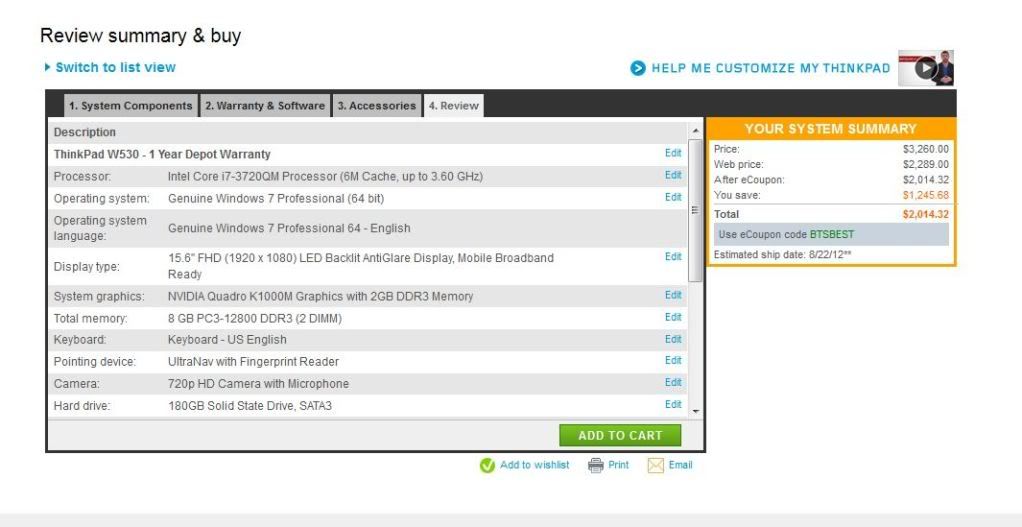
The W520 is no longer made, so I subbed the W530.


Comparing Apples to Apples, so to speak...

Same 2.6GHZ Intel quad-core processor
Windows Pro vs OSX
1920x1080 was the best monitor available for 15" for Lenovo vs 2880x1800 retina display by Mac
Lenovo has what is probably a very good video card. Mac has two built in video cards.
16GIG of RAM in 2 DIMMs for both
Backlit keyboard for both
Both have a ****ty camera built in
180GIG SSD is the most available for Lenovo. The Mac comes with a 256 GIG.
I added an external DVD-RW for the Mac, the Lenovo has one built in.
Since the Mac has a better battery life, I added the better battery for the Lenovo.
Both have Bluetooth and Wifi (though you had to add the bluetooth and pay extra for it in the Lenovo.

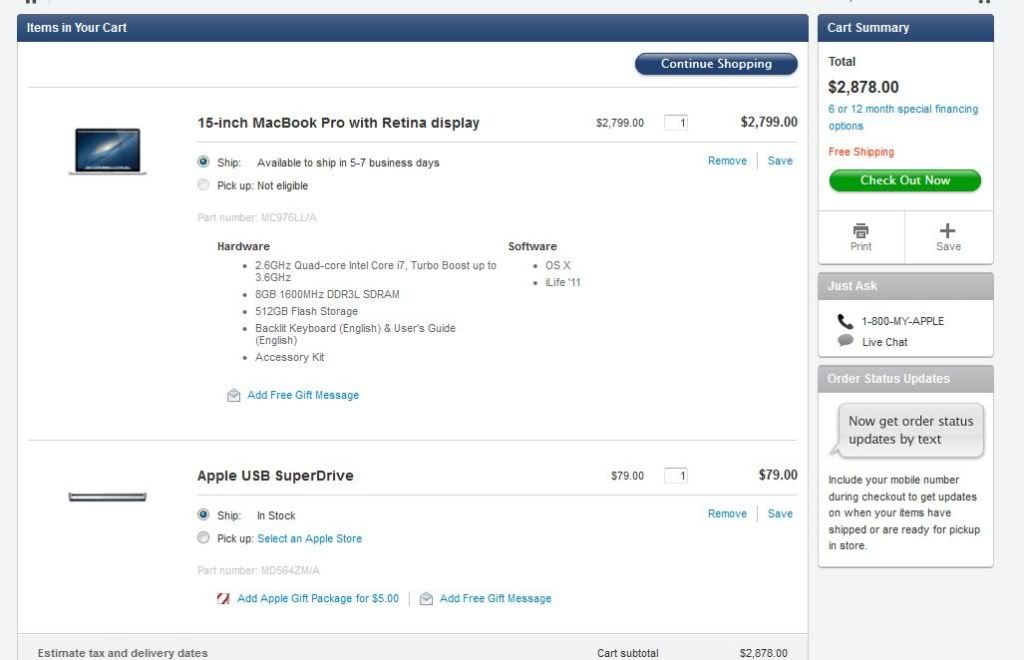
So Apples to Apples, the Mac is $300 cheaper, but you get a much better screen and a much better HD and the extras in OSX like iLife. That is with Lenovo's special coupon that may happen all the time and may not.

[This message has been edited by Guitarsoup (edited 8/15/2012 5:38p).]
fig96
How long do you want to ignore this user?
Serious question: outside of RAM and hard drive, what do you upgrade in a laptop?
sellis2003
How long do you want to ignore this user?
quote:
Serious question: outside of RAM and hard drive, what do you upgrade in a laptop?


I prefer my wifi internal, but that's not a deal killer, so I've replaced several wifi cards over the years.

There for awhile you could update the graphics as they were making the chips modular, similar to a processor upgrade... I've also seen people upgrade the processors, but realistically... The majority of the population uses them until they die or the battery won't hold a charge.


-S
SF2004
How long do you want to ignore this user?
quote:
So Apples to Apples, the Mac is $300 cheaper, but you get a much better screen and a much better HD and the extras in OSX like iLife. That is with Lenovo's special coupon that may happen all the time and may not.


Oops!

quote:
Serious question: outside of RAM and hard drive, what do you upgrade in a laptop?


You don't, it is a lame argument used by people like Spicewood and 99centbeer to bash apple and the people that choose to buy their product. These arguments always end with them saying but but but people only buy apple because they are stoopid and want to be a hipster... when they clearly make solid products with good value as demonstrated above.

I love when they question someones intelligence for choosing apple, I just wonder if they would insult their doctors intelligence as they update their chart on their iPad.
Stasco
How long do you want to ignore this user?
Can we create a Nerd Rivalries board for all of the Mac v. Windows and iPhone v. Android slap fights?
95_Aggie
How long do you want to ignore this user?
you fanboys on both sides keep having the same arguments over and over and over and over again
Fuzzbutt
How long do you want to ignore this user?
I would say that upgrading the RAM and hard drive is a pretty huge deal to me. It'll probably keep me from getting one. As long as you go into the purchase knowing that and knowing that the advertised resolution isn't fully customizable then knock your socks off.
99CentBeer
How long do you want to ignore this user?
quote:
Please point me to the ultrabooks for $1,000 that have the specs, battery life, AND a 2560x1800 display.


Umm... the majority of PC-based ultrabooks out there? Not hard to find one. Minus the retina display, of course. However, I'm perfectly happy with the 1920x1080 13.3" display on my Zenbook Prime. Any higher of a resolution and I would have to increase the font DPI anyways just in order to see the screen. But yes, there's no debating that Apple has the highest pixel density screen out there.

quote:
You don't, it is a lame argument used by people like Spicewood and 99centbeer to bash apple and the people that choose to buy their product.


Did you not even read my reply? I was DEFENDING Apple in this thread. You're so offended that people are questioning Apple that you didn't even realize that.

I think it's less about upgradability, and more about the ability to service the laptop easily if something breaks, though. If your RAM goes bad in an ultrabook, you're screwed. But as I mentioned, this is something that is consistent across almost ALL ultrabooks, not just Apples. As electronics get smaller and more compact though, that will just be the natural progression of things. It's no fault of Apple.
SpicewoodAg
How long do you want to ignore this user?
We can argue (it would get repetitive) about apples to apples in laptops.

But I don't see a MBP Retina for 2499 on Apple's website.

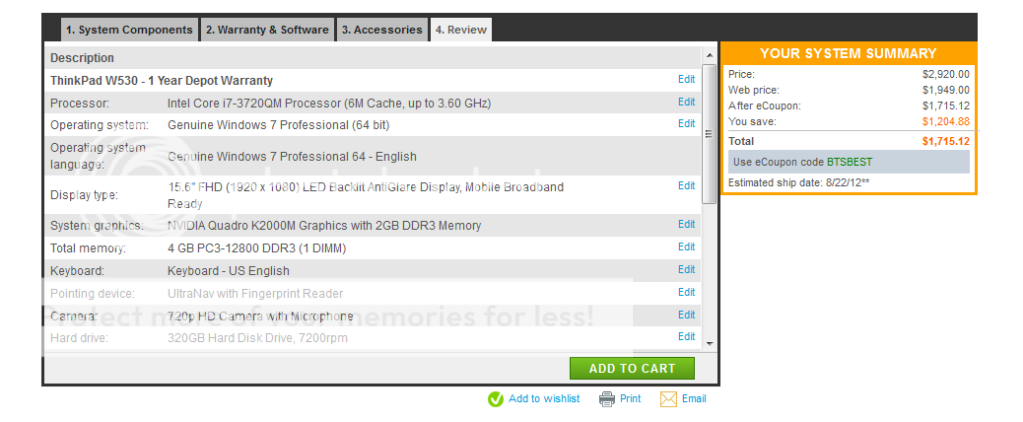
I compared a W530 with 8 Gb, its largest SSD, same processor, and the lesser graphics adapter (because it was still a 2 GB vs. MBP 1 GB). Added an optical drive to the MBP. Added the bigger battery to the W530. The MBP has Retina and a bigger SSD.


Since I can add memory later to the Thinkpad, that's what I would do with the W530. Since memory is not upgradeable on the MBP I might buy 16Gb. I know that 16Gb is not an advantage for most applications.

Some of you think the MBP style is important. I think it is a negative. I think of a computer as a computer, not a fashion statement. So the industrial look of the W530 is better for me. Believe it or not. I also think most smartphones of all brands are too thin already. I'd rather have a bigger (replaceable) battery.

In my view the W530 is only $700 cheaper. Not $1000. I was wrong.

Guitarsoup
How long do you want to ignore this user?
So you are comparing a 512 SSD with a 180 SSD? Seriously? Come on. You aren't that dumb, why would you upgrade one when the other doesn't have a similar upgrade? That is beyond idiotic and proves that you are doing this with an agenda, not in the interest of finding the real deal. That upgrade you can't replicate with the ThinkBook added $500 to the price of the MBP.

[This message has been edited by Guitarsoup (edited 8/16/2012 8:59a).]
SpicewoodAg
How long do you want to ignore this user?
The Thinkpad doesn't offer a bigger SSD. Would you not buy a computer for that reason? Maybe. The Thinkpad can also replace the optical drive with another hard drive - spinning or SSD.

Because the SSD in the Thinkpad is an SSD, not soldered in the computer, it can be replaced later if needed.

Are you serious that the MBP can never have storage capacity added???? Have to carry an external to hold all those raw photos, videos, or 3D animation?

My only agenda here is that I would buy the Thinkpad. It is more in line with what I value in a computer. Some of you value something else. That's OK.
Guitarsoup
How long do you want to ignore this user?
quote:
The Thinkpad doesn't offer a bigger SSD. Would you not buy a computer for that reason? Maybe. The Thinkpad can also replace the optical drive with another hard drive - spinning or SSD.


Explain adding a $500 upgrade to one thing you cannot match with the other.
OWC already makes HDs that can replace the MAC one.

quote:
Because the SSD in the Thinkpad is an SSD, not soldered in the computer, it can be replaced later if needed.


At additional cost. And that cost will be about the cost of the Mac one. But you still added the 512 SSD to jack up the Mac cost even though the Lenovo couldn't match it, so the 256GIG one is a more reasonable choice for configuring the two computers to match, unless you are trying to be an unreasonable jackass.

quote:
Are you serious that the MBP can never have storage capacity added???? Have to carry an external to hold all those raw photos, videos, or 3D animation?


OWC is already making SSDs to replace the MBP one.

And I carry an external for redundancy, even though I already have a second HD in my computer.

quote:

My only agenda here is that I would buy the Thinkpad. It is more in line with what I value in a computer.

So why are you making unreasonable unequal upgrades and trying to act like they are equal?

The only thing you proved is that it costs a couple hundred dollars more to get a lighter computer with a bigger hard drive and a better screen. If you upgrade both, the Lenovo ends up costing more.

[This message has been edited by Guitarsoup (edited 8/16/2012 11:38a).]
sellis2003
How long do you want to ignore this user?
quote:
The Thinkpad doesn't offer a bigger SSD. Would you not buy a computer for that reason? Maybe. The Thinkpad can also replace the optical drive with another hard drive - spinning or SSD.

Because the SSD in the Thinkpad is an SSD, not soldered in the computer, it can be replaced later if needed.

Are you serious that the MBP can never have storage capacity added???? Have to carry an external to hold all those raw photos, videos, or 3D animation?

My only agenda here is that I would buy the Thinkpad. It is more in line with what I value in a computer. Some of you value something else. That's OK.


As I noted earlier, You can easily upgrade the rMBP SSD, it's just in mSATA format instead of a 2.5" HDD size SATA.

OWC already has a replacement drive available for those that ordered the 256GB and found it wanting. It won't be long before others are on the market as well.

http://eshop.macsales.com/shop/SSD/OWC/Aura_Pro_Retina_2012


It's a super easy upgrade, remove the screws on the bottom of the laptop and remove the one screw holding the mSATA drive in place, remove the drive, slide in the new one and replace all the screws.

-S
AgDev01
How long do you want to ignore this user?
quote:
At additional cost. And that cost will be about the cost of the Mac one. But you still added the 512 SSD to jack up the Mac cost even though the Lenovo couldn't match it, so the 256GIG one is a more reasonable choice for configuring the two computers to match, unless you are trying to be an unreasonable jackass


Considering this thread is about being able to do the upgrades yourself adding the price quoted from lenovo on ram or SSD upgrades is dishonest considering i can get 16gb ram and a 256gb SSD from crucial for 330 or over 1k less that the cost of what is included those for those two upgrades than in the quote you posted.

If you would like i can also pull up other posts where i have specifically called you out for being wrong by trying to inflate the cost of a pc in these types of comparisons before.


Add 300 for the previously mentioned upgrades and we are at 2k not the 2.8 k you mentioned earlier.

quote:
If you upgrade both, the Lenovo ends up costing more.


not if you use options available to the lenovo model not available to the mac


[This message has been edited by AgDev01 (edited 8/16/2012 1:01p).]
Guitarsoup
How long do you want to ignore this user?
Apples to Oranges. OEM vs Aftermarket.
AgDev01
How long do you want to ignore this user?
quote:
OWC is already making SSDs to replace the MBP one.


is not OEM. are you seriously trying to say it is not legitimate to look at other manufacturers products and prices in a thread about being able to do upgrades yourself? one in which you even pointed out an aftermarket manufacturer to upgrade a macbook?
SpicewoodAg
How long do you want to ignore this user?
Guitarsoup - I didn't intentionally add the 512Gb flash.

That is what was on the configuration of Apple's web page. When I scrolled to the two base configurations it offered the 2.3Ghz MBP and the 2.6Ghz. The faster unit had 512Gb.

I suppose to be fair I should have downgraded it to 256Mb. Since the flash storage in the MBP is not upgradeable though, it might make sense for a MBP buyer to buy both the 512Mb flash storage and the 16Gb RAM.

quote:
OWC already makes HDs that can replace the MAC one.


Not for the Retina MBP. It doesn't use an SSD per se. It uses "flash memory" soldered in the unit. Apple says:

"Please note that the flash storage is built into the computer, so if you think you may need more storage capacity in the future, it is important to upgrade at the time of purchase."


[This message has been edited by SpicewoodAg (edited 8/16/2012 1:13p).]
Guitarsoup
How long do you want to ignore this user?
quote:
is not OEM. are you seriously trying to say it is not legitimate to look at other manufacturers products and prices in a thread about being able to do upgrades yourself? one in which you even pointed out an aftermarket manufacturer to upgrade a macbook?


No, I am saying that everyone that says the mac HD isn't upgradeable is an idiot.

I compared OEM to OEM as close to matching as possible.

You compared upgrading everything to aftermarket to OEM. That wouldn't be fair on any any computer comparison.

quote:
Guitarsoup - I didn't intentionally add the 512Gb flash.

That is what was on the configuration of Apple's web page. When I scrolled to the two base configurations it offered the 2.3Ghz MBP and the 2.6Ghz. The faster unit had 512Gb.


Oh ok. I started with the $2100 MBP Retina and upgraded the processor then added the SuperDrive.

quote:
Since the flash storage in the MBP is not upgradeable though, it might make sense for a MBP buyer to buy both the 512Mb flash storage and the 16Gb RAM.


You keep saying that you can't upgrade the storage in the MBP, but it simply isn't true and has been debunked several times.

The RAM you would have to do when you bought, which I agree sucks.

quote:
Not for the Retina MBP. It doesn't use an SSD per se. It uses "flash memory" soldered in the unit. Apple says:


http://eshop.macsales.com/shop/SSD/OWC/Aura_Pro_Retina_2012
Click that link. You can buy the upgrade there. It exists. I'm sure Apple dislikes that it exists, but it does exist.
sellis2003
How long do you want to ignore this user?
quote:
quote:
OWC already makes HDs that can replace the MAC one.


Not for the Retina MBP. It doesn't use an SSD per se. It uses "flash memory" soldered in the unit. Apple says:

"Please note that the flash storage is built into the computer, so if you think you may need more storage capacity in the future, it is important to upgrade at the time of purchase."


How many times does this have to be brought to your attention. The SSD in the rMBP is simply mSATA, instead a regular SATA 2.5" HDD. It is very easily upgradeable. It is the same type of configuration for the MacBook Air.

-S
sellis2003
How long do you want to ignore this user?
Upon a little further research,I misspoke, it looked like mSATA, but it is Apple's own custom pin-out, but it is still essentially as simple to replace as any other mPCI-E card, mSATA card, etc. Just that since it's not standard mSATA it limits what aftermarket upgrades will be available.

-S
99CentBeer
How long do you want to ignore this user?
And to sum up this thread...

Noble Men
How long do you want to ignore this user?
What does it cost to add a blu-ray player to that Mac?

[This message has been edited by Noble Men (edited 8/17/2012 11:33a).]
99CentBeer
How long do you want to ignore this user?
General rule of thumb is to take the average price you can buy an upgrade yourself, multiply by 4.5, and that would be the Apple upgrade cost.
Refresh
Page 1 of 1
 
×
subscribe Verify your student status
See Subscription Benefits
Trial only available to users who have never subscribed or participated in a previous trial.